
Main Menu
Menu

Show posts

This section allows you to view all posts made by this member. Note that you can only see posts made in areas you currently have access to.

Show posts Menu

Messages - Marinepower

#1
SC2 Tools / Blizzard Image Downloader
July 13, 2010, 01:51:04 PM

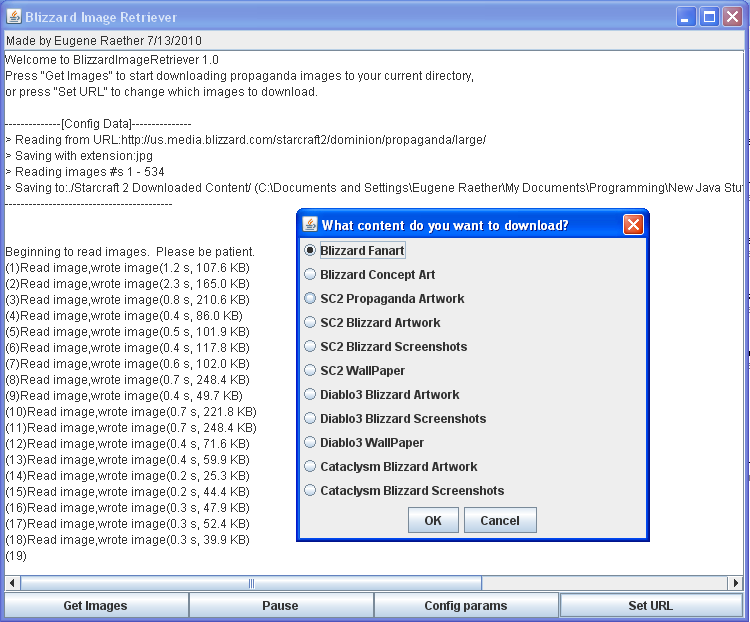
Hey guys, here are the results from a few hours of programming:  The Blizzard Image Downloader.  Basically, choose what image content you want, and the program will automatically begin transferring it to your computer.  Nothing too serious, but immensely helpful.  Just let it run in the background while it downloads files, and when it's finished, browse through the images at lightning speed.


Currently, it retrieves the following images:
Blizzard Fanart
Blizzard Concept Art
SC2 Propaganda Artwork
SC2 Blizzard Artwork
SC2 Blizzard Screenshots
SC2 WallPaper
Diablo3 Blizzard Artwork
Diablo3 Blizzard Screenshots
Diablo3 WallPaper
Cataclysm Blizzard Artwork
Cataclysm Blizzard Screenshots


for a grand total of 2473 images.


Anyways, here's the download link:
http://vipersrt3g.com/marinepower/Blizzard%20Image%20Retriever.jar
Enjoy!


Note: Get the latest java plugin before running.
#2
SC2 Tools / Re: APM Spy by CraniX
June 06, 2010, 11:39:31 AM
From the above screenshot it seems like your program outputs the same results as the in-game apm counter.  As such, what exactly do we actually gain from dling your app?
#3
SC2 Tools / Re: Watch Some Sweet SC2 Animations
March 13, 2010, 12:18:37 PM
lol, alright, I'll try to add in the functionality sometime this weekend.
#4
SC2 Tools / Watch Some Sweet SC2 Animations
February 28, 2010, 06:39:28 PM
Hey all,
just whipped this program up today.  Simply put, this program allows you to enter the url of any image on the web, break it into smaller images, and display the resulting images as an animation.  All of the SC2 animation files found within the assets MPQ file have been uploaded to my website, so that you may use this program to view the images as animations. 

If enough people request the functionality, I'll allow this program to output the animation as a .GIF animation, and include a .zip file including all of the animations.


How to use
-----------

1) Download the program at: http://vipersrt3g.com/marinepower/SpriteSheetAnimationDisplay.jar
2) Run the program
3) Go to File -> Load From URL
4) Go to http://vipersrt3g.com/marinepower/Animations/
5) Pick a file from the list, copy the url, and paste it into the program
6) Tweak the animation interval if it's running too fast or too slowly

7) Enjoy some professionally rendered animations

Note - you need java to run this.  DL it at www.java.com